Why You Should NEVER Delete Transactions in QBO
When Your Books Don’t Match Your Bank Statement: A Banking & Bank Reconciliation Guide for Business Owners
Mismatches between your financial books and bank statements are a common occurrence that can arise for various reasons. Such discrepancies can interfere with your financial records, leading to misguided decision-making based on inaccurate data, which bank reconciliations help to resolve. To avoid these pitfalls, the importance of regular banking reviews and bank reconciliation cannot be overstated. By understanding the process of reconciliation and its significance, businesses can maintain smoother financial operations and clearer insights into their fiscal health.
Understanding Bank Reconciliation: How Banking, Bank Statements, and Bookkeeping Work Together
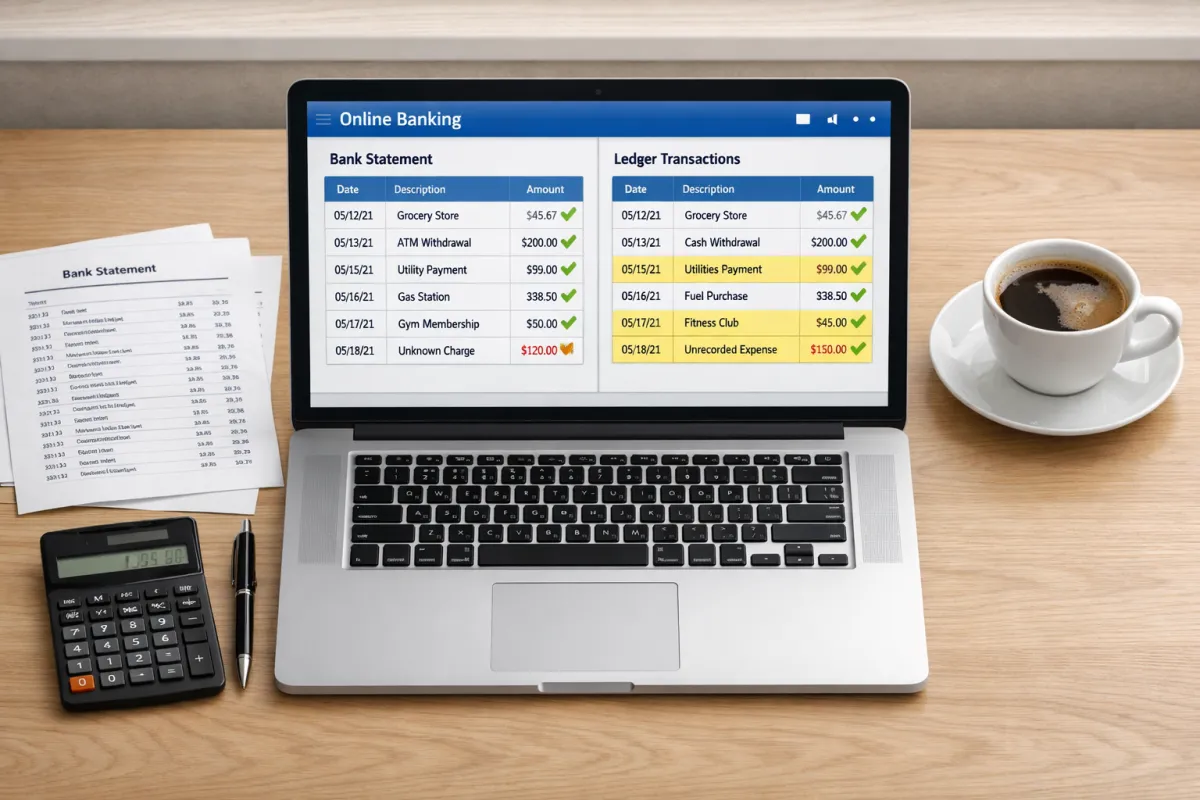
Bank reconciliation is the process of comparing the bank statement balance with your company's ledger or books to ensure they align. This essential bookkeeping task helps maintain accurate financial records, providing a true picture of your business's financial status. Common causes of mismatched balances include timing differences, errors in transaction recording, and unaccounted transactions. Reconciling your bank accounts regularly can catch these issues early, preventing more significant problems down the line.
Finding the Discrepancy: When Your Book Balance and Bank Balance Don’t Match the Bank
When your bank balance does not match your book balance, the first step is to review both records. Start by checking for transactions that appear in one record but not the other. Common sources of discrepancies include:
Timing Differences: Transactions that may have cleared the bank after the books were last updated.
Bank Fees: Charges or fees that have not been recorded in your bookkeeping.
Errors: Mistakes made in entering transactions in either the bank or your ledger.
Missing Entries: Transactions you might have overlooked while updating your records could be listed on your bank statement.
Identifying these discrepancies is crucial for moving forward with reconciliation.
How to Reconcile Your Accounts: Step‑by‑Step Bank Reconciliation to Match the Bank
Gather Your Documents:
Collect your bank statement, ledger, and transaction list.
Match your bank transactions using QuickBooks to simplify the process.
Start ticking off transactions that appear in both your bank statement and books to match the bank balances.
Investigate Unmatched Entries:
For any unmatched transactions, check for duplicates, unrecorded transactions, or incorrect amounts listed on your bank statement.
Adjust your financial records in QuickBooks to reflect the actual bank transactions accurately.
Make necessary bookkeeping adjustments to reflect any changes or corrections needed.
Verify the Ending Balance:
Ensure that after adjustments, your books now match your bank statement balance.
By following this systematic approach in QuickBooks, you can streamline the reconciliation process and maintain accurate financial records.
Common Banking Issues Behind Mismatched Balances: Opening Balance, Bookkeeping Errors, and Bank Statement Gaps
Several issues commonly lead to mismatches between your bank statement and books:
Outstanding checks and deposits in transit can complicate the match the bank process. Checks that have not yet been cashed or deposits that are still processing can disrupt balances.
Bank Errors vs. actual bank discrepancies that may affect your financial records.
Bookkeeping Errors: Sometimes, banks make mistakes, but human error in bookkeeping is also a frequent culprit.
Incorrect Opening Balances: Errors in initial balances can cause ripple effects in your financial records.
Recurring Transactions Not Recorded: Regular payments or receipts that haven’t been documented can lead to discrepancies.
Addressing these issues proactively will help in maintaining better financial accuracy.
Preventing Future Discrepancies: Banking Best Practices and Bookkeeping Habits for Business Owners
To minimize discrepancies moving forward, consider implementing the following strategies:
Regular Bank Reconciliation Schedule: Set a timeline (monthly or quarterly) for reconciling your accounts.
Automating Transaction Matching Tools: Automating transaction matching tools in QuickBooks can enhance the efficiency of your reconciliation process. Leverage software tools that can automatically match transactions, reducing manual effort and potential errors.
Best Practices in Bookkeeping and Banking Workflows: Establish clear protocols for recording transactions.
Setting Up Checks to Catch Errors Early: Create internal checks or alerts in QuickBooks Online that can notify you of potential discrepancies as they occur.
By making these small business practices routine, you can significantly reduce the chances of encountering mismatches.
When to Get Help: Professional Bank Reconciliation Support for Accurate Financial Records and Peace of Mind
If you find persistent discrepancies that you cannot identify, or if you're dealing with multiple accounts or complex transactions, it may be time to seek professional help. A qualified bookkeeper or accountant can offer valuable assistance in ensuring that your small business financial records are accurate and up-to-date. Their expertise can uncover issues that may not be immediately apparent, helping you maintain robust financial health.
In summary, addressing mismatches between your financial books and bank statements is essential for maintaining accuracy in your financial reporting. By implementing consistent reconciliation practices and staying proactive about potential discrepancies, you can safeguard your business's financial integrity.
